Version 4.8 beta released – Faceted search

Live Filter

Update: Version 4.8.0 with the faceted search feature has been released officially on October 5th 2017 (see the release notice)

After months in development, we are excited to share the new feature in the upcoming 4.8 version of Content Views Pro. The beta version has been built and ready to be downloaded on this page or in the Downloads section of your profile page. To help ensure that there are no problems with 4.8, we would like to invite all Pro customers to help test the beta version.

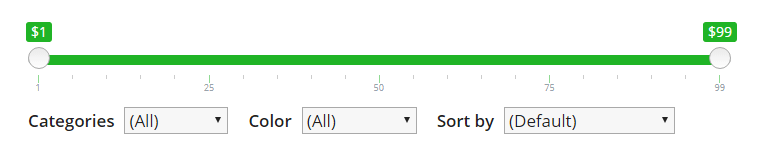
The 4.8 version includes a very new feature “Live Filter”, which supercharges the frontend search & filter functionality of Content Views Pro. It helps you to show faceted search to your site visitors easily without any line of code. Let’s take a look at some benefits of Live Filter.

Continue reading “Version 4.8 beta released – Faceted search”

Version 4.7.1

* Compatible:
– Fix: No featured products found of WooCommerce 3.0.0 or later
– Fix: No posts found in non-default languages of WPML with WordPress 4.8.0
– Fix: Error “Call to undefined function wc_get_product()” after deactivate WooCommerce plugin, in the View which enables “Show Sale Badge”

* Tweak:
– [Replace Layout] Remove some classes of old layout while replacing layout of archives pages
– Add filter “pt_cv_ads_slots” to modify ads slots (default value is 10)

Version 4.7.0

* New:
– Introduce the soft resizing feature for images
– [Replace Layout] Add options to fix some conflicts with theme

* Compatible:
– Pinterest, Masonry layout don’t render correctly when enabled lazy-load feature of WP Rocket plugin

* Update:
– [Replace Layout] Disable existing pagination of WordPress archives pages when enables custom pagination in selected View
– [Replace Layout] Show existing advertisements in the View, and remove the relative setting option in Content Views >> Settings page
– [Sticky post] Leverage code in WordPress core to handles the “Place all sticky posts at the top of list” feature, and remove relative CVP code
– More smooth animation when appending posts for Pinterest, Masonry, Shuffle Filter with load-more, infinite scrolling pagination

Version 4.6.1

* Fix:
– Float issue of other posts in One & Others layout

* Update:
– Able to replace layout of only specific terms and keep old layout of other terms
– Add some filters to customize View output, to modify thumbnail substitute feature

Version 4.6.0

* New:
– [Replace Layout] Able to set different Views for different categories, tags…
– [Replace Layout] Able to show comment block when replacing layout of single post, page, custom post type
– [Replace Layout] Completely support all Shuffle Filter settings when replacing layout
– [Style Settings] Add “Text Align” setting for all elements
– [Display] Able to allow all HTML tags in post excerpt’s output
– [Display] Able to execute shortcode in custom field’s value
– [Display] Able to leave width or height empty (to maintain image proportion) when set custom size for thumbnail
– [Display] Support relative URL when customize link of a post title, thumbnail, read-more button in View
– [Display] Able to drag & drop to change display order of taxonomies under “Meta fields >> Taxonomy >> Let me choose”

* Update:
– [Style Settings] Remove “Color & Font” label, use clearer description/text for some settings
– [Display] Use post title as alt for featured image if its alt is empty
– [Lightbox] Show whole page content if the “Content Selector” matches no element
– [Lightbox] Disable page scrolling when lightbox is open

* Compatible:
– Replace layout of taxonomy archives returns no posts found with “Search Everything” plugin active
– Fix warning when WordPress filter “wp_get_attachment_image_attributes” is applied in theme or another plugin, but missing argument 2 or 3
– Fix update issue with iThemes Sync

Version 4.5.0

* New:
– “Replacing Layout” now works for single post, page, post type
– Able to use custom fields to shuffling posts in front-end, for example [pt_view id="VIEW_ID" shuffle_custom_field="FIELD_1, FIELD_2, FIELD_3"]
– Add setting to exclude password protected posts
– Add style setting for inactive pagination items

* Compatible:
– Pinterest/Masonry layout is not shown when using View to show results of FacetWP plugin
– Support WooCommerce category thumbnail when using “Show terms as output” feature

* Update:

– Able to set operator for second taxonomy when reusing View

Version 4.4.0

* New:
– Show related posts of current post easily (read more)
– Show custom field, meta field… of current post easily (read more)
– Can use “Custom Size” without setting Height value, to resize the image but keep its natural ratio
– [Masonry layout] Add filter to customize which posts to be shown bigger
– Add setting to exclude any fields from the overlay of thumbnail easily

* Fix:
– [Conflict with Photon feature of Jetpack plugin] Thumbnail is not visible in mobile devices, when enable lazy loading

* Update:
– Refactor functions of “Show terms as output” feature

Version 4.3.0

* New:
– Can use “Sort by” setting of selected View when Replace Layout of Blog, Category… page
– Can use Shuffle Filter with Collapsible layout
– Can adjust border width, color, style in Grid layout with new style settings
– Can filter posts by month 1 to 12 (for example filter posts in January of every year)
– Can show both Author name & avatar
– Can add words to ignore when extract index in Glossary layout
– Can change display order of taxonomies in Shuffle Filter
– Can reuse View by set new value to compare for selected custom field in the View

* Improve:
– [Shuffle Filter] Increase speed and reduce CPU usage on displaying new posts which are loaded dynamically by pagination
– Update custom-size image function to resize image by URL rather than attachment ID
– More clear and simple label, text for some settings

* Fix:
– Shuffle Filter does not work when shows Advertisement in View

Version 4.2.2

* Update:
– Able to show Advertisement in “All” tab of Shuffle Filter
– Update Lazyload script to handle cached images by browser
– Remove default underline text decoration for links on hover, in Timeline layout

Version 4.2.1.2

* Update:
– Remove border of Grid item (when enable border) in Tablet devices if “Items Per Row (Tablet)” is 1
– Output of custom field in Tablet devices
– Output of collapsible item in RTL direction